Add per posting questions that correspond to job qualifications/requirements
To assist in narrowing or focusing the search for applicants with the necessary experience, qualifications, etc. you can add per posting questions to your job postings. Then, as with any question, the responses can be listed alongside the applicant's name, etc.
This example assumes you are hiring a math department head and the minimum requirements for the position are a master's degree plus a specific state certification/licensure. Also, you would prefer candidates with at least five years of documented experience. The idea is to only accept applicants that have the minimum criteria and also collect how many years of experience each applicant has.
Here's how:
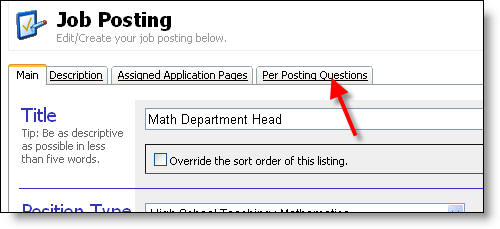
1) After entering information on the "Main" and optionally the "Description" tab, navigate to the "Per Posting Questions" tab.
2) Enter the required qualifications in the form of questions.
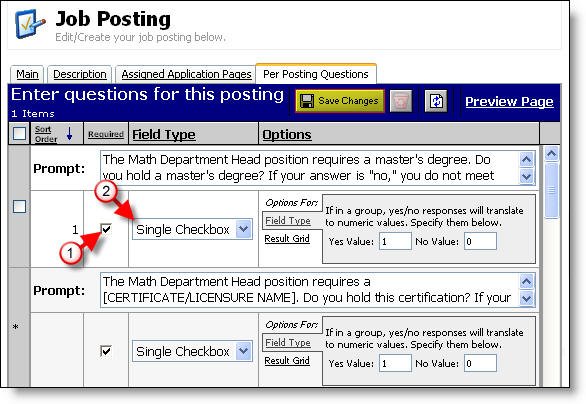
Note that each requirement is listed as (1) Required = "Yes" and (2) Field Type = "Single Checkbox."
3) Save your changes and then click the Preview Page link. The previewed page is below.
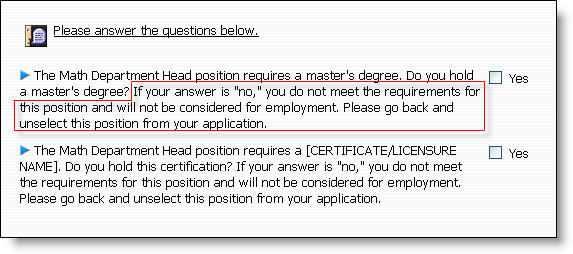
Note the outlined text above. Because this field is required and the applicant's only option is to check "Yes", applicants who do not meet minimum criteria (in this case a master's degree) will not be able to proceed or submit their application. The outlined text above informs the applicant of this qualification and instructs the applicant to unselect the position if they are not qualified.
4) Enter preferred qualifications as additional questions. Note the set up of the "Result Grid" tab below.
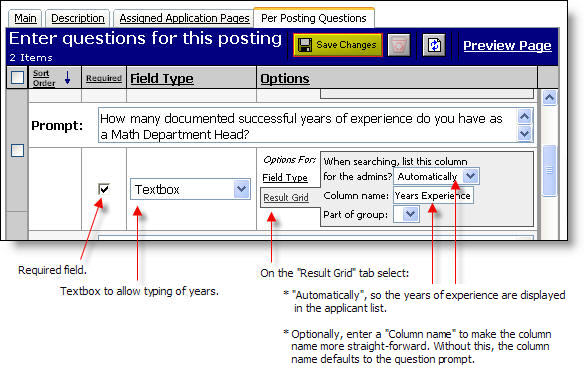
5) After saving and previewing we see what all applicants to this position will be presented with.
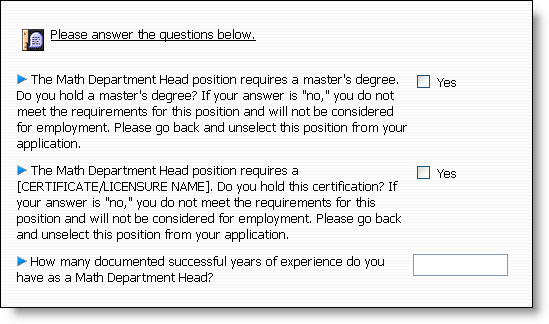
6) Done! Read the topics below to understand more about the page editor features.
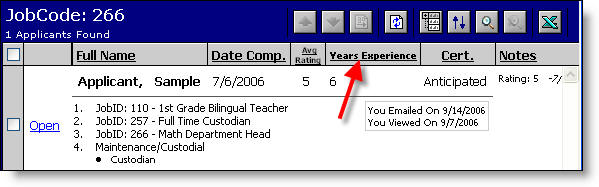
7) A sample list of applicants for the Department Math Head shows the "Years Experience" column name. This column is automatically listed because of the "Result Grid" settings above.